Dollywood App Guide: 5 Features Every Visitor Should Use
If you’re planning a trip to Dollywood, one of the smartest things you can do before arriving is download the official Dollywood app.
While the park still provides maps and information inside the gates, the app gives you something even better: real-time updates, mobile ordering, and digital ticket management right from your phone.
Instead of guessing wait times or wandering the park looking for your next attraction, the app helps you make quick decisions and adjust your plans throughout the day.
Think of it as a park planning tool, digital ticket holder, and navigation guide all in one.
Quick Tips: Using the Dollywood App
Before diving into the full guide, here are a few quick things to know about the Dollywood app that can make your visit smoother:
• The Dollywood app is completely free and available for both iPhone and Android devices.
• You can store tickets, season passes, and add-ons directly in the app for quick park entry.
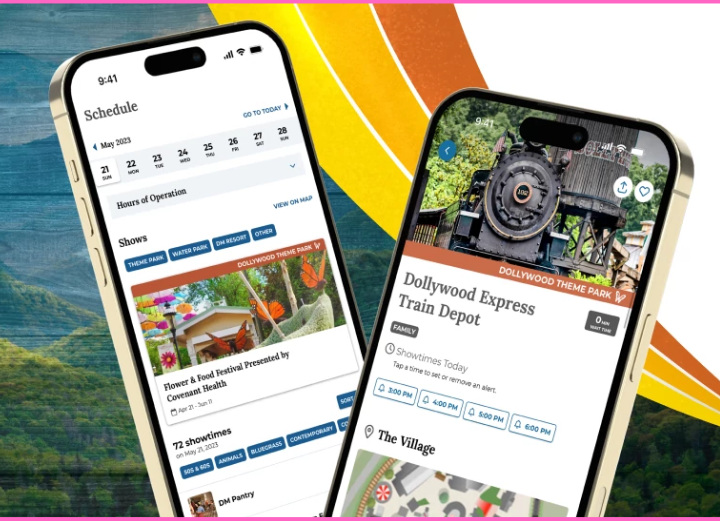
• The app shows real-time ride wait times, show schedules, and park hours.
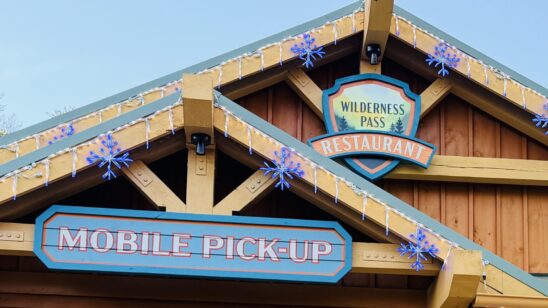
• Many restaurants offer mobile food ordering, allowing you to skip dining lines.
• The interactive map includes GPS navigation, helping you find rides, dining, restrooms, and guest services.
💡 Pro Tip: Download and set up the app before arriving at the park. Linking your tickets and exploring the map ahead of time saves valuable time once you enter Dollywood.
Here are five of the most useful features every Dollywood visitor should know about before their trip.
1. Store Your Tickets and Season Passes in One Place
One of the most helpful features of the Dollywood app is the ability to store and manage your tickets and passes digitally.
Instead of searching through emails or printing confirmations, you can link everything directly inside the app.
Once your tickets are connected, you can:
- Scan a QR code directly at park entry
- Store passes in Apple Wallet or Google Wallet
- Access season passes, bring-a-friend tickets, and add-ons in one place
This makes getting into the park much faster and reduces the chance of losing or misplacing paper tickets.
Pro Tip
If you plan to use the Dollywood app to manage your tickets, skip printing a physical ticket at the front gate. Mixing paper tickets with digital passes can occasionally cause scanning issues at entry.
2. Check Real-Time Ride Wait Times
The Dollywood app provides real-time attraction wait times, which can be incredibly helpful when planning your route around the park.
Instead of walking across the park only to discover a long line, you can quickly check the app to see current wait estimates for major attractions.
This helps you:
- Decide which rides to visit next
- Avoid the longest lines during peak hours
- Adjust your plans throughout the day
The wait times are estimates, but they’re usually accurate enough to help you make smarter decisions about where to go next.
Pro Tip
This feature becomes especially valuable when rides experience temporary delays due to weather or operations, allowing you to quickly pivot to another attraction instead of waiting nearby.
3. Use the Interactive Map to Navigate the Park
Dollywood is a beautiful park, but it’s also large and spread across several themed areas.
The app’s interactive GPS-enabled map helps you find exactly where you need to go without studying a paper map.
With the interactive map you can:
- Locate rides, restaurants, and restrooms
- Find guest services and first aid locations
- Filter attractions by thrill level, height requirements, or accessibility
The map also helps guests understand how the park connects together, making it easier to move between areas like Craftsman’s Valley, Wildwood Grove, and Timber Canyon.
Pro Tip
The map isn’t just helpful inside the park. It can also guide you from the parking areas to the main entrance, which is especially useful for first-time visitors.
4. Save Time with Mobile Food Ordering
Food is a big part of the Dollywood experience, from cinnamon bread to barbecue and festival treats.
The Dollywood app allows guests to place mobile food orders from participating restaurants, which can save a surprising amount of time during busy meal hours.
Using the app, you can:
- Browse restaurant menus
- Order and pay from your phone
- Receive a notification when your food is ready
Instead of standing in line during peak lunch or dinner times, you can grab your food quickly and get back to enjoying rides or shows.
Pro Tip
Mobile ordering is available for many dining locations and seasonal food booths. However, tasting pass selections for festivals cannot currently be redeemed through the app.
5. Keep Track of Showtimes and Festival Events
While Dollywood is famous for its rides, the park is also known for its live music, theater performances, and seasonal festivals.
The app helps you stay updated with:
- Current show schedules
- Theater locations
- Event updates during festivals
You can also set reminders so you don’t miss popular performances that fill up quickly.
For visitors who want to experience both rides and entertainment, this feature makes planning your day much easier.
Pro Tip
Turn on push notifications during your visit. The app can alert you to important updates like ride closures, show reminders, or park announcements.
Bonus Feature: Build a Personalized Park Plan
One of the lesser-known features of the Dollywood app is the ability to create custom planning lists.
You can build a list of attractions, shows, or dining spots you want to visit and check them off throughout the day.
This is especially helpful for families who want to keep track of must-do experiences.
Pro Tip
Families or groups who split up during the day can use these lists to coordinate plans and meet up later at shared attractions.
Why the Dollywood App Is Worth Downloading
While the Dollywood app isn’t required to enjoy the park, it makes planning your day much easier.
With features like real-time wait times, interactive maps, and mobile ordering, the app helps you spend less time waiting and more time enjoying rides, shows, and attractions.
The best approach is to download the app before you arrive at the park, link your tickets, and explore the features so everything is ready when you walk through the gates.
Once you’re inside Dollywood, having that information at your fingertips can make your visit smoother, more flexible, and much more enjoyable.